Sample Scenarios
This topic illustrates how Cobra’s application-level and file-based security settings affect menu item accessibility for different user roles and groups.
Through practical examples, the section shows how permissions are determined based on a user’s primary role, group assignments, and access control lists (ACLs) and highlights the expected results for various configurations.
EPM SA Setup
The following roles, groups, and users will be used in the scenarios:
Roles
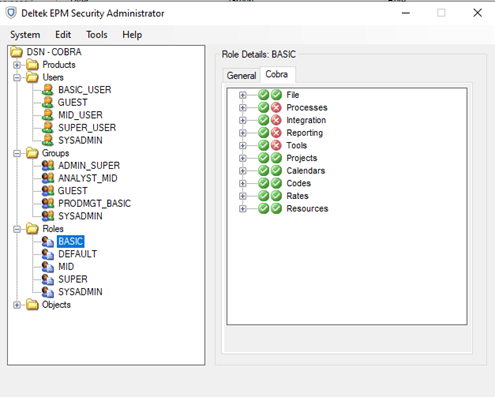
- BASIC: The Processes, Integration, Reporting, and Tools items are set to
Visible and
Disabled.
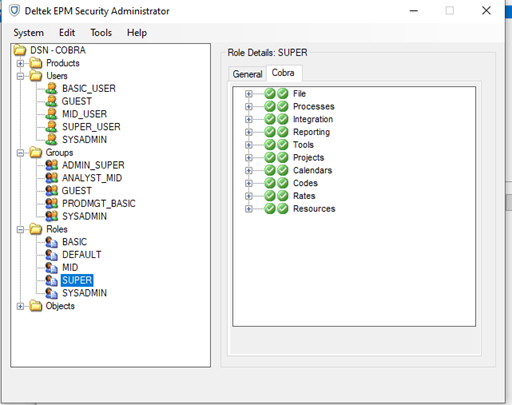
- SUPER: All items are set to
Visible and
Disabled.
Groups
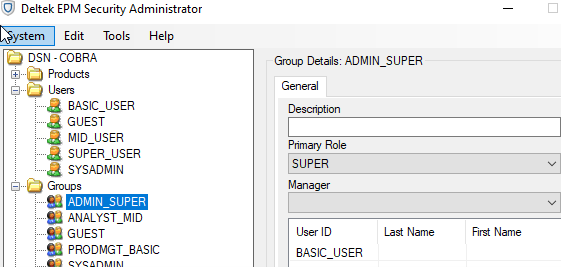
- ADMIN_SUPER: This is the primary role of SUPER.
Users
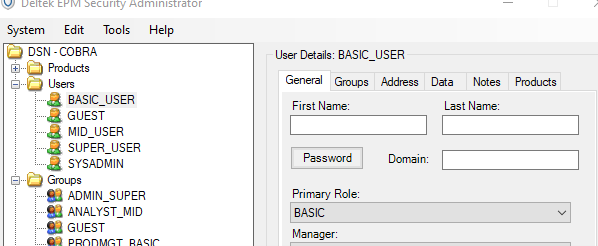
- BASIC_USER: The user has the primary role BASIC and is part of the ADMIN_SUPER group.
Scenarios for Login User: BASIC_USER
The following scenarios apply when the login user is BASIC_USER, along with the expected results for each scenario.
Scenario 1: BASIC_USER owns the project

Expected Results
- Menu items that use file-based security will be enabled:
- Processes tab
- All items
- Integration tab
- Assignment Import/Export
- Open Plan Resources
- Open Plan Calendar
- Reporting tab
- Analyze
- Tools tab
- Replace Resources
- Update Totals
- Validity Check
- Processes tab
- Menu items that use application-level security will be disabled because the user’s primary role (BASIC) has these items disabled in EPM SA (for example, Integration Scheduling tools.)
Note: The ACL for BASIC_USER is ignored for application-level secured items, even if it is set to SUPER.
Scenario 2: BASIC_USER does not own the file nor have an ACL assigned to it

Expected Results
- The file is not visible in Cobra. Menu items that rely on file-based security cannot be tested.
- Menu items that use application-level security will be disabled because the user’s primary role (BASIC) has those functions disabled in EPM SA.
Scenario 3: BASIC_USER and/or ADMIN_SUPER are assigned to the project ACL without defined roles

Expected Results
- No role is assigned to BASIC_USER or ADMIN_SUPER in the Project ACL; the user’s primary role (BASIC) will apply. Since the BASIC role disables the Processes, Integration, Reporting, and Tools nodes in EPM SA, all menu items under those tabs will also be disabled.
Scenario 4: BASIC_USER and ADMIN_SUPER are both assigned to the project's ACL with more permissive roles

Expected Results
- Menu items that use file-based security will apply the role that grants the most access when both the Group and the User have assigned roles. In this case, Cobra uses the SUPER role, which provides access to all Cobra items.
- Menu items that use file-based security will be enabled because the SUPER role grants access to the Processes, Integration, Reporting, and Tools tab in EPM SA.
- Processes tab
- All items
- Integration tab
- Assignment Import/Export
- Open Plan Resources
- Open Plan Calendar
- Reporting tab
- Analyze
- Tools tab
- Replace Resources
- Update Totals
- Validity Check
- Processes tab
- Menu items that use application-level security will be disabled because the user’s primary role (BASIC) has these items disabled in EPM SA.
Note: The ACL for BASIC_USER is ignored for application-level secured items, even if it is set to SUPER.
- The same results are observed if you interchange the defined roles for both the BASIC_USER and the ADMIN_SUPER group.
Scenario 5: BASIC_USER and ADMIN_SUPER are both assigned to the project's ACL with less or equally permissive roles

- Cobra will use the role that grants the most access to the user based on the defined roles. In this case, ADMIN_SUPER has no role defined, so it will use BASIC_USER’s primary role (for example, BASIC). Since both ACL entries use the same role, functions are secured based on the BASIC role. Both application-level and file-based secured menu items will be disabled because the user’s primary role (BASIC) has those functions disabled in EPM SA.